Data Versioning
Deeplake datasets have built-in version control. Every mutation is tracked, and you can branch, tag, and merge just like with Git.
Managed tables expose the same versioning system. client.open_table() returns a deeplake.Dataset with full version control.
Set credentials first
Commits
Every call to ds.commit() creates an immutable snapshot.
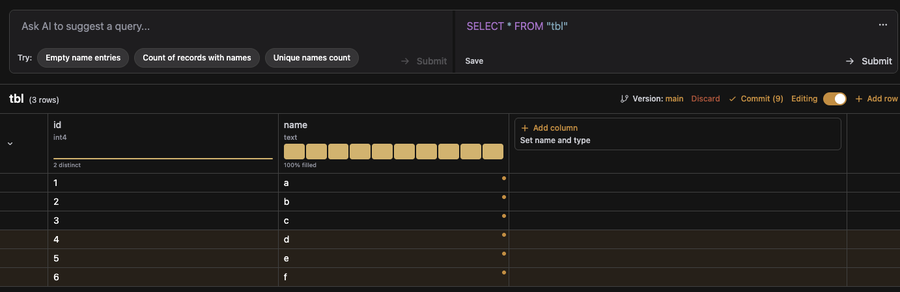
In the app, toggle Editing on the table view, make your changes (add rows, edit cells, add columns), and press Commit to persist them as a new version. The number next to the button counts pending edits, and each modified row shows a small marker until it is committed.
History
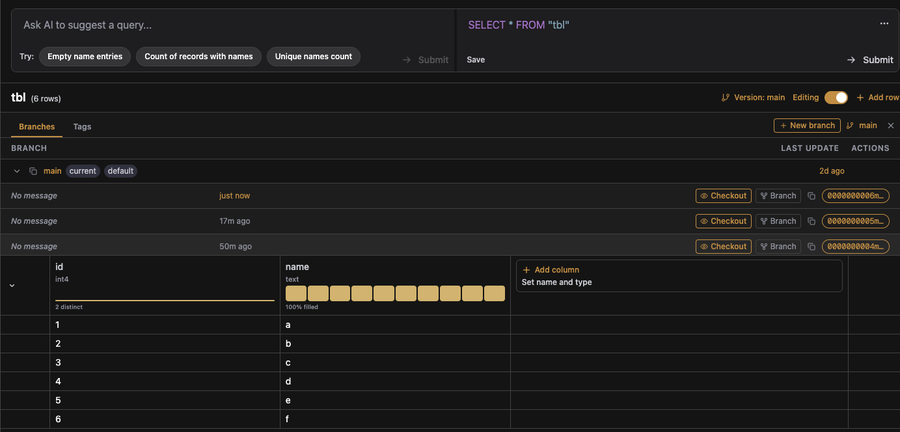
Click Version: main in the table header to open the branches / tags panel. From there you can see every commit on the current branch (newest first), check out an earlier commit, or create a new branch from any commit.
From the SDK, iterate over all versions from oldest to newest:
Access a specific version by ID or index:
# By index
first = ds.history[0]
latest = ds.history[-1]

# By version ID
version = ds.history[version_id]

# Open the dataset at that point in time
old_ds = version.open()
Version properties
| Property | Type | Description |
|---|---|---|
id |
str |
Unique version identifier |
message |
str \| None |
Commit message |
timestamp |
datetime |
Storage-provider timestamp |
client_timestamp |
datetime |
Writer's local clock |
Reverting to a prior version
ds.revert_to(version) rolls a branch back to an earlier commit, keeping the history before it. It appends a single marker that makes every commit after version inert at replay — an append-only equivalent of git reset --hard that does not rewrite or delete history. version is the last commit to keep; everything committed after it is rolled back.
v = ds.version
ds.append({"text": ["row to drop"]})
ds.commit()

ds.revert_to(v)   # drops the appended rows, keeps history
Revert a specific branch (defaults to the current branch):
Pass message to describe the revert commit. When omitted, a default is generated ("Revert commit {v}", or "Revert commits from {v1} to {v2}" for a range):
This is an admin operation: do not write the branch concurrently while it runs.
Branches
Create a branch to work on data in isolation, then merge back.
# Create a branch
ds.branch("experiment")

# Open the branch
branch_ds = ds.branches["experiment"].open()

# Add data on the branch
branch_ds.append({"text": ["experimental row"]})
branch_ds.commit()
List and inspect branches
# List all branch names
print(ds.branches.names())  # ["main", "experiment"]

# Number of branches
print(len(ds.branches))

# Branch details
branch = ds.branches["experiment"]
print(branch.name)       # "experiment"
print(branch.timestamp)  # creation time
print(branch.base)       # (parent_branch_id, parent_version_id)
Rename and delete
Merge
Merge a branch back into main:
ds.branch("feature")
feature_ds = ds.branches["feature"].open()
feature_ds.append({"text": ["feature row"]})
feature_ds.commit()

# Merge into main
main_ds = ds.branches["main"].open()
main_ds.merge("feature")
Tags
A tag is a read-only, named view of the dataset at a specific version. Opening a tag returns rows you can read and query, but writes and commits are not allowed against it. Writes always go to a branch. Use tags to mark releases, checkpoints, or query snapshots that must not drift as the underlying branch keeps evolving.
Access tagged versions
tag = ds.tags["v1.0"]
print(tag.name)      # "v1.0"
print(tag.version)   # version ID it points to
print(tag.timestamp)

# Open the dataset at the tagged version
tagged_ds = tag.open()
List, rename, delete
# List all tags
for name in ds.tags.names():
    tag = ds.tags[name]
    print(f"{tag.name} → {tag.version}")

# Rename
ds.tags["v1.0"].rename("v1.0.0")

# Delete
ds.tags["v1.0.0"].delete()
Tag a specific version
Tag a query
Tagging the result of a query stores the query, not a copy of the rows. By default the tag is fixed to the version the query ran on:
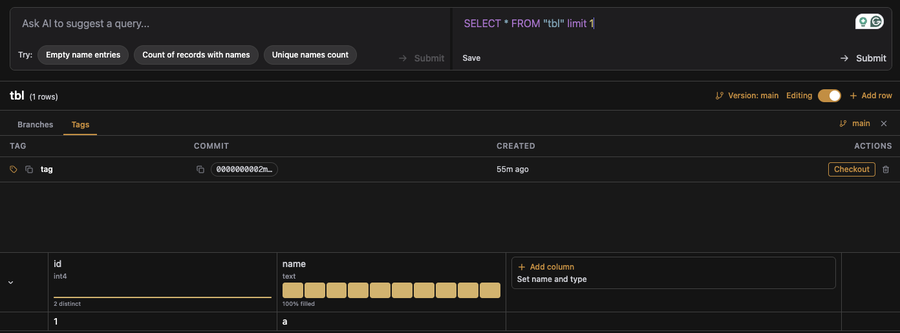
In the app, write a query in the top editor and press Submit to run it. Once the query has returned results, press Save underneath the editor to persist the query as a tag. The Tags panel on the left lists all saved query views.
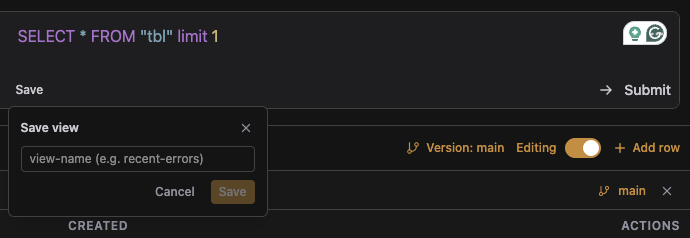
The Save view dialog asks for a name for the tag. The name shows up in the Tags list and can be opened later like any other tag.
Pass fixed_version=False to open the tag on the branch HEAD instead of a fixed version — it re-runs the query against the latest data every time it is opened:
ds.query("SELECT * WHERE status = 'active'").tag("active", fixed_version=False)

ds.tags["active"].open()   # re-runs the query on the current HEAD
fixed_version — Bool, default = True. If True the view/tag is opened on the fixed version of the branch, otherwise on the HEAD of the branch.
Tag properties
| Property | Type | Description |
|---|---|---|
id |
str |
Unique tag identifier |
name |
str |
Tag name |
message |
str |
Tag message |
version |
str |
Version ID the tag points to |
timestamp |
datetime |
Creation timestamp |
query |
str \| None |
The TQL query string if the tag was created from a query view, None otherwise |
Read-only access
To browse history and tags without making changes, open the table and use the version properties directly:
# Browse history and tags
for version in ds.history:
    print(version.id, version.timestamp)

tagged_ds = ds.tags["v1.0"].open()
branch_ds = ds.branches["main"].open()
When accessed this way, branches and tags return view objects (BranchView, TagView) that support open() but not rename() or delete().
Version control from SQL
Managed tables expose the same versioning system to SQL. The split is deliberate: SQL is the query surface, so it can read from any branch, tag, or historical version, list what exists, and merge. The lifecycle operations (creating a branch, tagging, reverting, deleting) stay on the SDK. Anything you write on the SDK side is immediately visible to SQL, and vice versa.
Reading at a branch, tag, or main
Reference a branch or tag by suffixing the table name with @. Because @ is not a normal identifier character, the whole reference must be quoted:
-- Current version of the main branch (bare table name, same result)
SELECT * FROM my_table;

-- Explicit main
SELECT * FROM "my_table@main";

-- Any other branch
SELECT * FROM "my_table@experiment";

-- Any tag
SELECT * FROM "my_table@v1.0";
The first reference to a @ref in a session materialises a virtual view; subsequent references in the same session reuse it.
Writing via @main
Writes to "my_table@main" behave identically to writes on the bare table name; both target the main branch. All the usual DML statements work:
INSERT INTO "my_table@main" (name) VALUES ('new row');
UPDATE  "my_table@main" SET name = 'renamed' WHERE id = 1;
DELETE FROM "my_table@main" WHERE id = 2;
To write to a non-main branch, use the SDK's ds.branches["name"].open() pattern shown above. Every write is committed at statement end; there is no explicit COMMIT command for the deeplog.
Current version and history
-- The current commit ID
SELECT deeplake_version('my_table');

-- Full commit history (like `git log`)
SELECT version_id, created_at, message
FROM deeplake_log('my_table')
ORDER BY created_at DESC;
| Function | Returns |
|---|---|
deeplake_version(tbl regclass) |
text. Current commit ID on the active branch |
deeplake_log(tbl regclass) |
TABLE(version_id text, created_at timestamptz, message text). One row per commit |
Listing branches and tags
SELECT name, id, created_at, parent_branch, parent_version
FROM deeplake_branches('my_table');

SELECT name, version_id, message, created_at
FROM deeplake_tags('my_table');
| Function | Returns |
|---|---|
deeplake_branches(tbl regclass) |
TABLE(name, id, created_at, parent_branch, parent_version) |
deeplake_tags(tbl regclass) |
TABLE(name, version_id, message, created_at) |
Reading raw rows at a specific point in time
The @ref syntax materialises a typed view. If you want the rows without the alias table, three JSONB / record-returning functions read directly:
-- One JSONB per row at the head of a branch
SELECT jsonb_pretty(j)
FROM deeplake_at_branch_json('my_table', 'experiment') AS j;

-- Same, for a tag
SELECT jsonb_pretty(j)
FROM deeplake_at_tag_json('my_table', 'v1.0') AS j;
For a specific commit, use deeplake_at_version together with deeplake_at_version_schema. The schema function tells you the columns you need to project:
-- What did the table look like at this commit?
SELECT * FROM deeplake_at_version_schema('my_table', 'main', 'abc123');
-- → name  | pg_type
--   id    | integer
--   name  | text

-- Read the rows using the reported schema
SELECT * FROM deeplake_at_version('my_table', 'main', 'abc123')
  AS r(id integer, name text);
| Function | Returns |
|---|---|
deeplake_at_branch_json(tbl, branch) |
SETOF jsonb. One row per record at the branch head |
deeplake_at_tag_json(tbl, tag) |
SETOF jsonb. One row per record at the tag |
deeplake_at_version(tbl, branch, version_id) |
SETOF record. Must be projected via AS r(col1 type1, ...) |
deeplake_at_version_schema(tbl, branch, version_id) |
TABLE(name text, pg_type text). The schema at that commit |
Merging a branch
-- Merge `experiment` back into main
SELECT deeplake_merge('my_table', 'experiment', 'ship experiment');
deeplake_merge(tbl, source_branch, message) runs against the current branch (usually main) and merges source_branch into it. message is optional.
What SQL doesn't do
These operations are SDK-only. Do them in Python, then query the result from SQL:
| Task | SDK call |
|---|---|
| Create a branch | ds.branch("name") |
| Create a tag | ds.tag("name") (optionally version=) |
| Revert a branch | ds.revert_to(version) |
| Delete a branch or tag | ds.branches["name"].delete() / ds.tags["name"].delete() |
| Rename a branch or tag | .rename("new_name") on the branch/tag object |
Next steps
- Tables: CRUD operations and column types
- Search: vector, BM25, and hybrid search
- Training with Data Lineage: versioning + reproducible training
- Training Reproducibility with W&B: track experiments across versions