Workload Identities
Workload Identities let a non-human workload (a CI job, a Kubernetes pod, an Azure Function) authenticate to Deeplake using the cloud identity it already has, instead of a long-lived Deeplake API token sitting in your secrets store.
Once an org admin registers the workload's cloud identity, the workload calls Deeplake by presenting an OIDC token from its cloud provider. The Deeplake API validates the token, looks up the identity, and binds the request to the org you registered it under. There is no separate Deeplake user account for the workload. The cloud identity is the principal.
Status: Azure service principals are supported today. AWS and GCS slots exist in the API but are not yet wired to validators; attempts to register them return unsupported workload identity type.
Prerequisites
| Requirement | Notes |
|---|---|
| Org admin role in Deeplake | Only admins can register a workload identity. |
| An Azure service principal that your workload uses | Could be a User-Assigned Managed Identity, an App Registration, or a federated identity. You only need its client_id and tenant_id. |
The workload can mint a token for audience https://management.azure.com |
This is the default Azure AD audience and works for managed identities, Workload Identity Federation on AKS, GitHub OIDC to Azure, etc. |
Register a workload identity
The flow has three clicks in the Deeplake UI plus two fields you paste from Azure.
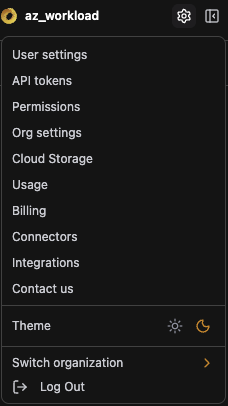
1. Open org settings
In the Deeplake app, click your organization name in the top bar to open the workspace, then go to Settings in the left sidebar.
2. Add a Workload Identity
In the Workload Identities section, click Add.
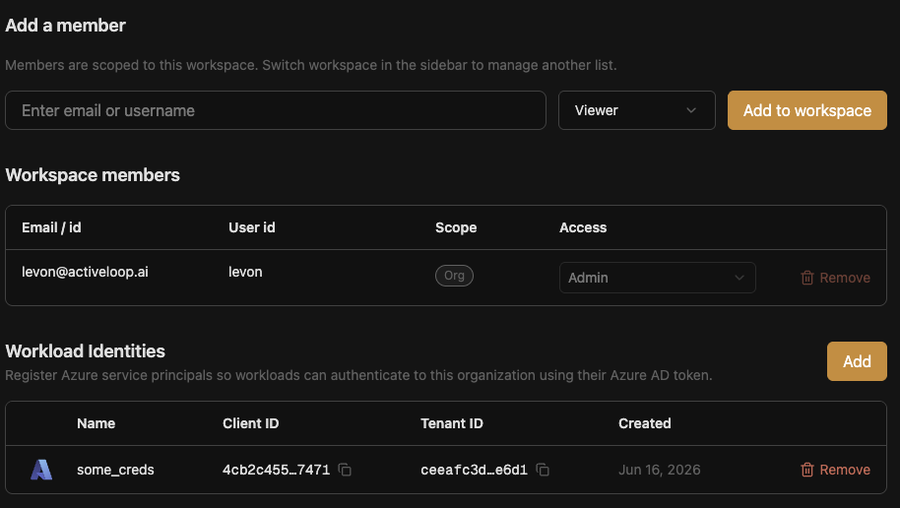
If the section is empty, you will see this same screen with no existing rows. Each row shows a registered identity, its type (today only azure), and when it was registered.
3. Fill in the identity details
A form opens with three fields:
| Field | What to paste | Where to find it in Azure |
|---|---|---|
| Name | A human label for this identity. Letters, digits, hyphens, underscores. Unique per org. | Your choice (for example, prod-etl-pipeline or ci-runner-staging). |
| Azure Client ID | The service principal's application (client) ID. UUID-shaped. | Azure Portal → Microsoft Entra ID → App registrations → your app → Overview → Application (client) ID. For a Managed Identity, use Client ID from the identity's Overview tab. |
| Azure Tenant ID | The Azure AD tenant the identity lives in. UUID-shaped. | Azure Portal home → Tenant ID in the top-right tile. Or run az account show --query tenantId -o tsv. |
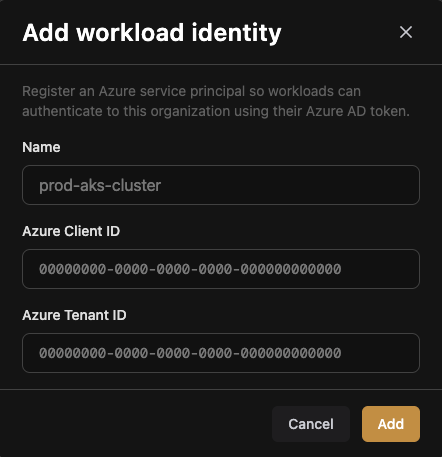
Click Save. The identity is registered immediately and your workload can authenticate from now on.
Use the workload identity from a workload
Once the identity is registered, the workload authenticates with the SDK by passing auth_provider="azure". The SDK mints the OIDC token from the local Azure environment at every request, so there is no Deeplake bearer token to rotate.
from deeplake.managed import Client

client = Client(
    auth_provider="azure",        # tells the SDK to mint an Azure OIDC token
    workspace_id="default",
    org_id="<org-uuid>",          # required when the same SP is registered in
                                  # more than one org; otherwise inferred
)

rows = client.query("SELECT count(*) FROM my_table")
The SDK:
- Calls
IDENTITY_ENDPOINT/DefaultAzureCredentialto mint an Azure token for audiencehttps://management.azure.com. - Sends the token as
Authorization: Bearer …along withX-Activeloop-Auth-Provider: azure. - Includes
X-Activeloop-Org-Idwhen you setorg_id=, to disambiguate identities registered in multiple orgs.
Deeplake's auth middleware validates the token, looks up the (client_id, tenant_id) pair in the registered workload identities, and proceeds as if the principal were a member of the matching org.
What's stored
Only the public identifying fields. Deeplake never holds an Azure client secret or certificate. Token minting stays in your cloud.
type           = "azure"
azure_client_id = <UUID from your SP>
azure_tenant_id = <UUID from your tenant>
name           = <your label>
created_by     = <user who registered>
The identity row also carries an internal org_id that scopes every request authenticated by it.
Permissions on the registered identity
The workload gets organization-member access in the org it is registered under, via the same FGA grants a human user would receive on join. The mode-driven cred-mint check applies: an identity used to read data needs viewer, an identity that writes needs writer. If you registered an identity that can read but you actually wanted it to write, re-grant in the Members page.
If the same (client_id, tenant_id) pair is registered in more than one org (e.g. a shared CI runner used by two business units), the SDK's org_id= field decides which org the request is scoped to. Without it, the API returns 409 with workload identity matches multiple orgs; org_id required.
Delete a workload identity
Same screen, row's three-dot menu → Delete. The next request the workload makes will fail with 401; you can re-register at any time with the same (client_id, tenant_id).
Reference
| Endpoint | Method | Notes |
|---|---|---|
/organizations/{org_id}/workload-identities |
POST |
Register. Body is {name, workload_identity_data: {type, azure_client_id, azure_tenant_id}}. Returns the persisted row including id. Admin only. |
/organizations/{org_id}/workload-identities |
GET |
List. Returns {workload_identities: [...]}, newest first. Members of the org only. |
/organizations/{org_id}/workload-identities/{id} |
GET |
Get one. |
/organizations/{org_id}/workload-identities/{id} |
DELETE |
Delete. Admin only. |
Error codes the API surfaces:
400: invalid body, unsupported type (AWS or GCS today), or a UUID field that doesn't parse.403: caller is not an org admin (register/delete).409:nameis already taken in the org, or the same(client_id, tenant_id)is already registered here.
Behind the scenes, registration mirrors controlplane's POST /machine: it inserts into workload_identities and writes the org-member FGA tuple in the same transaction, so the identity is reachable as soon as the call returns 201.